How to learn from competitor ads without copying them
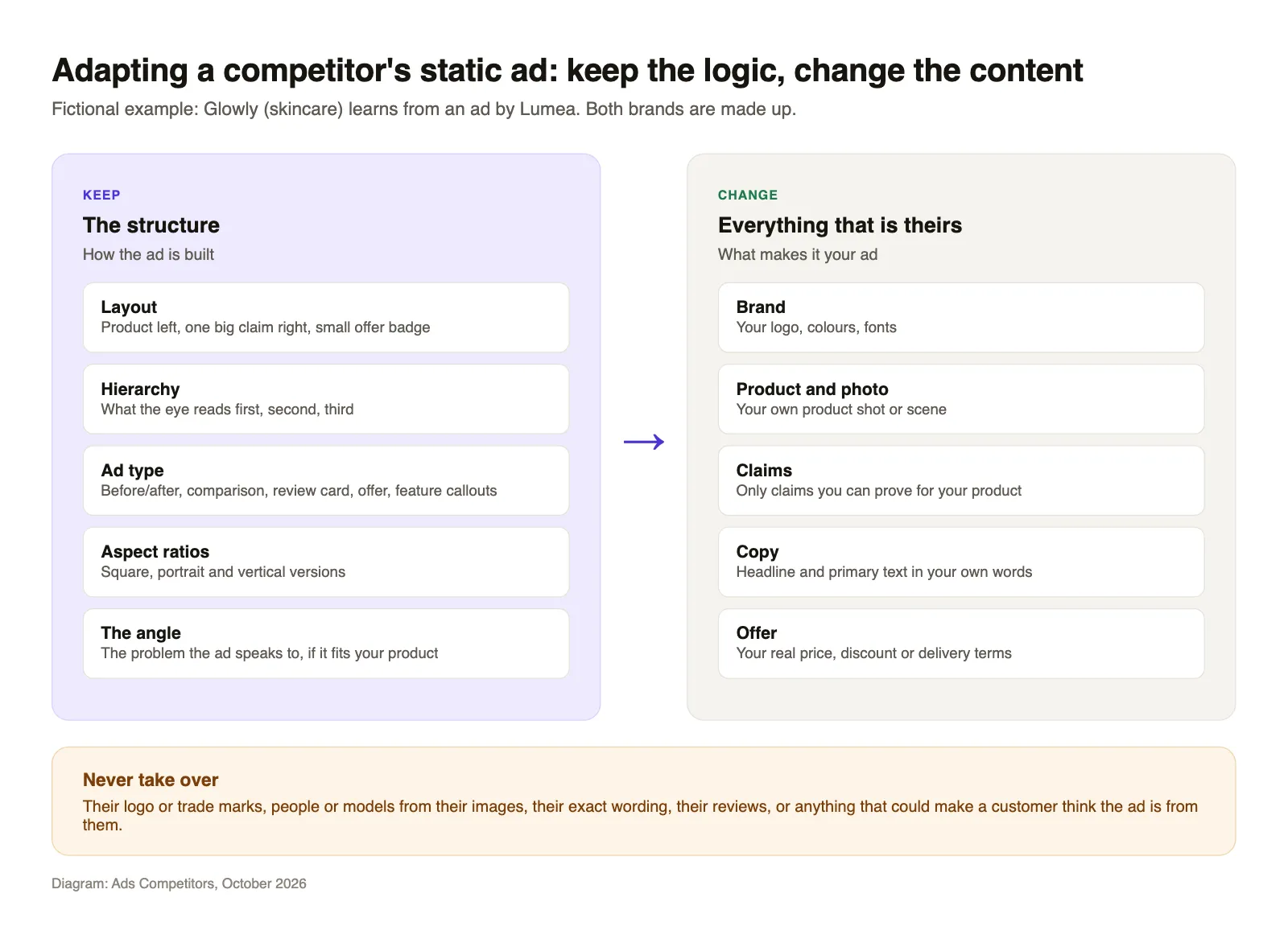
Competitor ads on Facebook and Instagram are public. Open the Meta Ad Library, set the country to United Kingdom, pick the competitor's Page and filter for images. Save every static ad (a single image with a headline, no video) that has been running for weeks or comes in several versions, because those are the ones the competitor keeps paying for. Then break each one into its structure: layout, reading order, type of ad and angle. Rebuild that structure with your own brand, product, claims and copy. What you never take over is their logo, their people, their exact wording or their reviews.
That is the whole method. The rest of this piece covers each step in more detail, with an honest note on what the signals can and cannot tell you.
Why static ads are the best place to start
A competitor's video ad mixes many decisions at once: the first second, the cut, the voice-over, the music, the pacing. When you watch it, it is hard to say which part is doing the work, and rebuilding it costs a shoot or an editor.
A static ad has far fewer moving parts. There is an image, a headline on or above it, the primary text, often an offer and a button. Because there are so few parts, you can see the decisions the advertiser made, and you can rebuild the idea with a product photo and a design tool in an afternoon. That is the practical answer to "static ads vs video ads" for competitor research. Both formats can work in a feed, and the data to say which performs better for your category is not public. Statics are simply easier to read and cheaper to test.
What to collect for each ad
The search itself (country, category, advertiser, media type filter) is covered step by step in our piece on Facebook Ad Library search, so here is only what to write down once you have a competitor's statics on screen. A spreadsheet is enough. For every ad, note:
- Library ID. It lets you find the same ad again next week.
- Start date. Shown on the ad card as the date it started running.
- Versions. Whether the card says the ad has multiple versions, and how many images you can see.
- Format. Square, portrait (4:5) or vertical (9:16), as far as you can tell.
- Headline on the image. Word for word, for your notes only.
- Offer. Discount, free delivery, bundle, free trial, or none.
- Ad type. One label from a short list you keep fixed, for example: product hero, before and after, comparison, review card, feature callouts, offer, problem and solution.
- Platforms. Facebook, Instagram or both.
The ad type label matters most. After a few weeks of notes you will see that a competitor relies on two or three types and keeps rotating them, which tells you more than any single ad.
How to judge which competitor ads are working
Meta does not show clicks, sales or return on ad spend for commercial ads. In the Archived Ad reference of the Ad Library API, the spend and impressions fields are only filled for ads about social issues, elections or politics. So you are working from indirect signals. Here is how far each one goes.
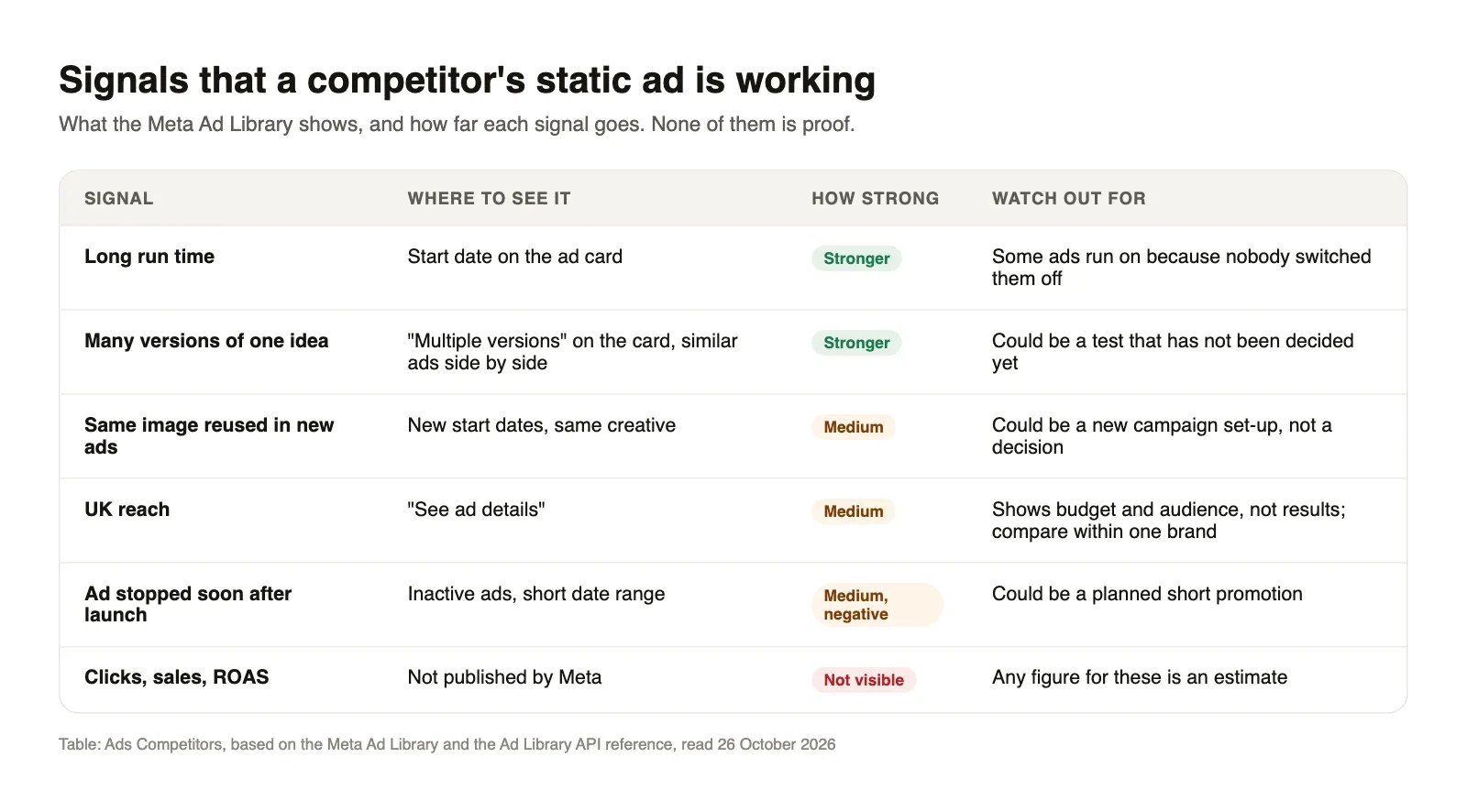
Run time is the strongest signal you have. An advertiser who has paid for the same image for many weeks usually has a reason. It is still not proof: some ads keep running because nobody switched them off, and a brand with a large always-on budget behaves differently from a small shop.
Many versions of one idea come second. The API reference describes how "some ads run with multiple ad versions or carousel cards each with their own unique text". When a competitor takes one image and tries five headlines, or one headline over five backgrounds, they are testing an idea they believe in. If those versions are still running weeks later, the idea has probably survived the test.
Reused creative is a softer signal. The same image appearing again in a new ad with a later start date can mean the advertiser moved a proven image into a fresh campaign. It can also mean a routine restructure. Note it, but do not build on it alone.
UK reach is shown in the ad details for ads delivered to the UK. The same reference lists total_reach_by_location with "EU, BR, and UK" as supported locations. Reach tells you how many accounts saw the ad, which reflects budget and audience size more than results. Compare it within one competitor, never across brands.
Ads that stopped quickly are the mirror image. If a competitor launched a new type of ad and it vanished within days, the test may have failed. Or it was a planned weekend promotion. Look at the dates around it before you draw a conclusion.
Put the signals together rather than ranking by one. An ad that has run for weeks, has gained new versions along the way and shares its type with other long-running ads is a good candidate to learn from. An ad that is two days old with high reach is just new.
Break the ad into parts you can reuse
Before you design anything, write one sentence for each part of the ad you chose. Take a fictional example: Lumea, a made-up skincare brand, has run a square static for several weeks. It shows the product on the left, one large claim on the right, a small round badge with an offer, and a plain background in one colour.
Your sentences might read:
- Layout: product left, claim right, badge top corner, nothing else.
- Reading order: claim first, product second, offer third.
- Ad type: product hero with a single benefit.
- Angle: speaks to people who have tried many products and want one that is gentle.
- Offer mechanic: a percentage off the first order.
None of these sentences contains anything that belongs to Lumea. That is the point. You have turned their ad into a brief.
Adapt the structure to your own brand
Now Glowly, another made-up skincare brand, builds its own version from that brief. What stays is the logic: one product, one claim, one offer, the same reading order and the same three formats. What changes is everything that makes the ad Glowly's:
- Brand. Glowly's logo, colours and fonts. The ad should look like Glowly at first glance, not like Lumea with a different name.
- Product and photo. Glowly's own product shot, ideally in a setting that fits its brand rather than a copy of Lumea's scene.
- Claim. Only a claim Glowly can back up for its own product. If "gentle" is not something Glowly can show, pick the benefit it can.
- Copy. A new headline and primary text written from scratch. Reading the original once and then writing without looking at it again helps.
- Offer. Glowly's real offer, with its real terms.
If the angle does not fit your product, drop it and keep only the layout. A structure that works for one brand's message will not necessarily work for a different message, but a clear layout with one claim tends to be a sound starting point for a test.
Make two or three versions of your adaptation rather than one. You are not trying to match the competitor's result, you are testing whether their idea works for your audience.
Where the line is
Looking at what competitors run is normal practice. Copying their ads is not. For UK advertisers, the clearest written guidance is Section 3 of the CAP Code, the non-broadcast advertising code the Advertising Standards Authority enforces. It is mainly about misleading advertising, and several rules apply directly to ads inspired by a competitor:
- Ads "must not create confusion between the marketer and its competitors", including between their trade marks and other distinguishing marks.
- Ads "must not take unfair advantage of the reputation of a competitor's trade mark, trade name or other distinguishing mark".
- If you turn the idea into a comparison with a named competitor, it must not "discredit or denigrate" them, and the comparison has to be objective and verifiable.
- A review card is a popular static format, but the code says ads "must not contain fake consumer reviews". Use only real reviews from your own customers.
In practice that means: no competitor logos or product shots, no people or models from their images, no headlines lifted word for word, no colour scheme or design so close that someone might think the ad is theirs. Images and text are also usually protected by copyright, so even a "small" reuse of a photo is a risk. This is not legal advice. If you plan a direct comparison with a named competitor, have it checked first.
A short routine to keep it going
Once a week, open each competitor's statics in the Library and update your sheet: which ads are new, which stopped, which keep running. Once a month, pick the one or two ads with the strongest combination of signals, write the brief, and build your own version. Over time your sheet becomes a record of which ad types survive in your category, which is worth more than any single example.
Where Ads Competitors fits
Ads Competitors does part of this for Meta static ads. You enter a competitor's brand name or an Ad Library link, it lists their active statics sorted by run time and groups repeated images, and it rebuilds a chosen ad in your brand with your logo, colours and font, in three variants and as 1:1, 4:5 and 9:16. You choose how close it stays to the original. It does not cover video or other networks, it cannot see clicks or sales either, and its reach figures come from Meta's EU data, so they will not match the UK reach in the Library. You check every result against the points above before you run it. You can try it here.