Facebook Ad Library search: what UK ads reveal
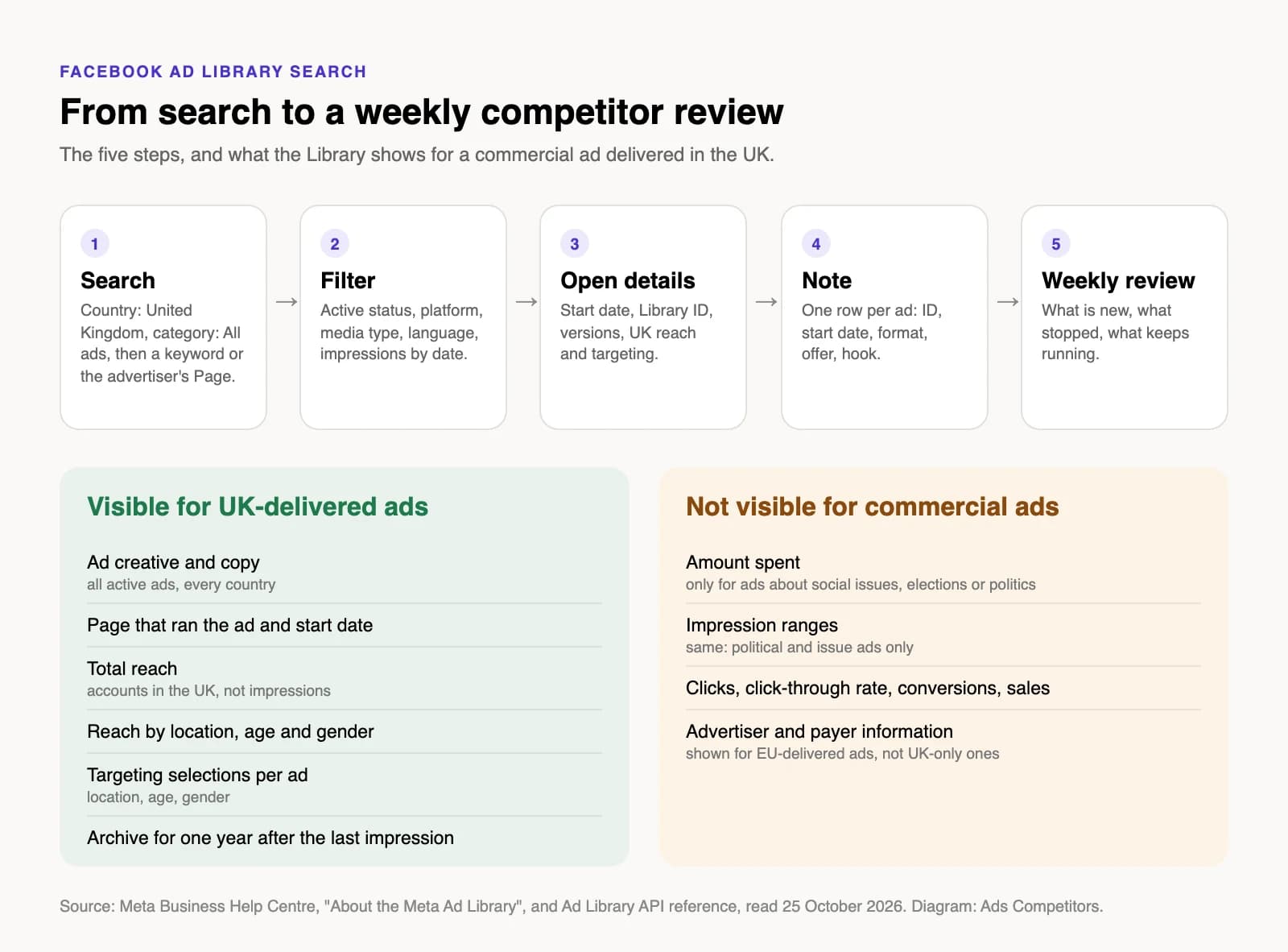
The Facebook Ad Library (Meta now calls it the Meta Ad Library) is Meta's public archive of ads running on Facebook, Instagram and its other apps. You open it at facebook.com/ads/library, set the country to United Kingdom, choose "All ads" as the category and type a keyword or an advertiser's name. No login is needed to search. For an ordinary commercial ad that reached people in the UK, here is roughly what you get and what you don't:
| You can see | You can't see |
|---|---|
| The creative and the ad copy | How much the advertiser spent |
| The Page that ran it and the start date | Impression counts |
| Total reach in the UK, split by location, age and gender | Clicks, click-through rate or conversions |
| The age, gender and location the advertiser targeted | Targeting beyond age, gender and location |
The rest of this piece walks through a Facebook Ad Library search step by step, explains how the UK and EU data differ, and ends with a routine you can run every week on a competitor.
What the Library holds, and for how long
According to Meta's Business Help Centre page About the Meta Ad Library, the Library "contains all active ads that are shown across Meta technologies". Active is the key word. An ordinary ad that only ran outside the UK and EU drops out once it stops, and you only see the date it started.
Three groups are kept longer. The Ad Library start page lists them, as of October 2026:
- ads about social issues, elections or politics from the past seven years;
- ads that have run anywhere in the EU in the past year;
- ads that have run in the UK in the past year, counted from 1 July 2025.
So for a UK brand, a competitor's ad that has already stopped can still be found for a year after its last impression, provided it ran after 1 July 2025. That makes "what did they run in the spring?" answerable. Meta also states that a new ad appears in the Library within 24 hours of its first impression, and edits show up within the same window. A launch from this morning may not be visible until tomorrow.
How to run a Facebook Ad Library search
The search has two modes that behave differently. Typing a word searches the ad text and Page names: Meta's help page says any ads that include the term, "or ads run by Pages that include the term, may appear". Choosing an advertiser from the drop-down suggestions shows only that Page's ads. For competitor research you nearly always want the second.
- Set the location first. The country selector decides which ads you see and which transparency data is attached. For UK research, pick United Kingdom rather than "All".
- Choose the category. "All ads" covers commercial ads. The other categories cover ads about social issues, elections or politics.
- Search by advertiser, not by keyword. Start typing the brand and pick its Page from the suggestions. A keyword search for a generic product term can return thousands of results from unrelated sellers.
- Filter. The filter panel offers language, advertiser, platform, media type and "impressions by date", plus active status. Media type is the quickest way to separate statics (single-image ads) from video.
- Open "See ad details". This is where the start date, the Library ID and, for UK and EU ads, reach and targeting live. Cards that say an ad has multiple versions bundle several variants of the same ad.
If you would rather pull this data with code, the Ad Library API has matching parameters: search_page_ids takes up to ten Page IDs, ad_reached_countries filters by country and ad_active_status switches between active, inactive and all. Read the coverage notes before you build anything, though. The ads_archive reference says ads that did not reach any EU location "will only return if they are about social issues, elections or politics", and the Business Help Centre describes the API as covering political ads and ads delivered to the EU and associated territories, without naming the UK. The field reference, on the other hand, already lists UK and EU fields. As of October 2026, check which UK-only ads your query actually returns before you rely on it.
Reading the details of a UK ad
The Business Help Centre page has a section for ads delivered to the UK, the EU and associated territories. For UK ads, Meta lists:
- Total reach. Reach counts accounts that saw the ad at least once, not how often it was shown. The API field
total_reach_by_locationreports it per location and, according to the Archived Ad reference, currently supports EU, Brazil and UK. - Reach breakdowns. Reach by targeted location in the UK, broken down by age and gender. In the API this is
age_country_gender_reach_breakdown, described as the demographic distribution of accounts "in the UK & EU reached by the ad". - Targeting selections. Ad-level data on the location, age and gender the advertiser selected (
target_locations,target_ages,target_gender). - Archive. One year from the last impression.
Two items differ between the EU and the UK. Meta lists advertiser and payer information as "EU only". And the API field eu_total_reach only covers locations inside the European Union, so an ad that ran in both regions has separate figures. If a competitor runs in Ireland as well as Great Britain, keep the two apart in your notes.
How to read the numbers without fooling yourself:
- Compare reach within one advertiser. Brands differ in budget and audience. Comparing an ad's reach against the same Page's other ads tells you more than ranking it against another brand.
- Treat targeting as intent, not result. The age and gender fields show what the advertiser selected. The reach breakdown shows who the ad actually reached. When the two diverge, delivery has leaned towards a group the advertiser did not single out.
- Use the start date as your main signal. Runtime, meaning how long an ad has been live, is the most reliable thing the Library gives you. An advertiser who keeps paying for the same ad week after week has a reason to.
What Meta leaves out
The gaps are just as important as the data. In the Archived Ad reference, the spend and impressions fields are "Available only for POLITICAL_AND_ISSUE_ADS", and so are the audience-size filters of the API. The help page lists no clicks, click-through rate, conversions or sales for any ad. For UK ads it names targeting by age, gender and location only, so assume you cannot see which interests or custom audiences an advertiser used.
In practice, you can see what a competitor is running, how long it has run and roughly who it reached in the UK. You cannot see whether it made money. Any tool that claims a competitor's ROAS or conversion rate from the Library is estimating, not reading it off.
Two smaller limits are worth knowing. Meta notes that the creative of ads with age-restricted content, such as alcohol or gambling, is not shown to people who are underage or not logged in, so log in if you research those categories. And an ad that Meta rejects or disables after it delivered an impression stays in the Library, but a shield covers the content.
A weekly routine for a UK brand or agency
Once a week is enough for most categories, and a fixed slot keeps it from turning into endless scrolling. Take Glowly, a fictional skincare brand, watching Lumea, a fictional competitor.
Monday, 20 minutes: collect. Open the Library with country United Kingdom, category "All ads", and select Lumea's Page. Set active status to active and sort through the results. For each ad, open the details and add a row to a shared sheet.
The sheet.
| Column | What goes in |
|---|---|
| Library ID | The ID from the ad card, so you can find the ad again |
| Started running | Date from the card |
| Format | Static, video or carousel, and the aspect ratio if you can tell |
| Hook | The first line of copy or the headline on the image |
| Offer | Discount, free delivery, bundle, none |
| UK reach | From the details, with the date you read it |
| Status this week | New, still running, stopped |
Monday, 10 minutes: compare. Look at three things against last week's rows. Which ads are new? Which stopped? Which have now been running for several weeks? The third group is the useful one. Note the hook and offer they share; a pattern across several long-running ads says more than one ad alone.
Once a month: zoom out. Switch active status to include inactive ads and use "impressions by date" to look back over the past weeks and check whether the competitor shifted from statics to video, changed their offer or started testing a new angle in many variants at once.
A few habits help. Write the date next to every reach figure, because reach grows while an ad runs. Save the Library ID rather than a screenshot, since the ID survives. And treat what you find as inspiration for your own tests, not as a template to copy.
Where Ads Competitors fits
Ads Competitors automates part of this routine for statics. You enter a competitor's brand name or a Meta Ad Library link, it sorts their active static ads by runtime, and it rebuilds chosen ads in your brand, with your logo, colours and font, in three variants and in 1:1, 4:5 and 9:16. You choose how close the rebuild stays to the original: Close, Similar or Remix. It only covers Meta and only statics, not video, and it has the same blind spots as the Library itself: no clicks or conversions, and any budget figure is an estimate. One difference matters for UK readers. The Library shows reach for UK-delivered ads, but the tool's reach and demographics come from Meta's EU transparency data and count only users in the EU. Don't expect its figure to match the UK reach on an ad's details page, and read UK reach in the Library itself. You check every result before you run it. If that sounds useful, you can try it here.